 Guest
Guest Help & Contact
 HOW IT WORKS

 SELL
SELL
 SIGN IN
 WHY US
Returns Accepted
 Safe and secure payments. 100% Satisfaction Guaranteed
Safe and secure payments. 100% Satisfaction Guaranteed
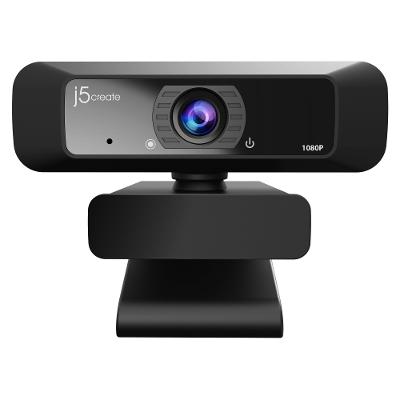
JVCU100 USB HD Webcam w/ 360 Rotation
$56.81
Buy Now
About this Item
Available stock:
38

Shipping


With the JVCU100 USB HD Webcam, you can enhance your conference calls with live video and audio. The HD camera is plug-and-play, meaning there is no driver installation required. The JVCU100 supports 1080p video playback at 30 Hz with H.264 streaming format.
Product Features:
F/2.4 aperture with low light enhancement USB plug-and-play High definition 1080p image sensor with wide angle lens Built-in high-fidelity microphone (the microphone is not available for Discord on Chromebook) Standard UVC/ UAC protocol, driver-free Supports Windows/macOS/Chrome OS systems Supports H.264 and MPEG image formats Maximum support 1920 x 1080/30 FPS image resolution Wide compatibility: Zoom, Facebook Messenger, Skype, Microsoft Teams, etc. Includes webcam Warranty: 2 years
Product Features:
| Estimated Delivery | 3-5 Business Days |
|---|---|
| Accessory Type | Camera |
| Features | F/2.4 Aperture for Low Light Enhancement; USB Plug-and-Play; High Definition 1080p Image Sensor, Wide Angle Len |
| Material(s) | Plastic, Glass |
| Warranty | 2 Years |
| Includes | Webcam |
| Item Dimensions | 0.034" x 7.56" x 4.06" |
| Item Weight | 3.74 lbs. |
| upc | 847626004896 |
This item does not ship to California, Hawaii, Alaska, Puerto Rico.
Customer Reviews

4.2 out of 5 stars based on 5 reviews

Upgraded from a 5 year old C920.
As someone who streams and creates content regularly, I don't wanna break the bank on items I don't have to. I used a c920 for about 5 years, but as I began to get some traction on my content, I wanted to upgrade the weakest link, which was the camera. I looked into getting digital mirrorless cameras like the Sony a7i and what not, but I would have to get a $400 camera, $200 camlink and a compatible mini hdmi cable. And after finding all that out, the $250 for this webcam sounded like a good deal. My old webcam was locked to 1080p 30fps or 720p 60fps, and now I can do 4k 60fps or 1080p 100fps and its such a huge boost in quality. Just remember, the most important part of a camera is the lighting.
ByOldner

Not worth $60 extra
I have used the Brio for Skype and Zoom meetings. Participants' comments are very positive re my audio and video, Logitech "Camera Settings" (Mac OS) allows an adjustment of field of vision and closeup or distance . One caveat: unit worked only when plugged directly into my computer - could not get it to work plugged into a hub.
ByRob Clark
Upgraded from a 5 year old C920.
The video image is beautiful. The FPS (Frames Per Second) is a dream. I have had no staggering of the video. I bought one for home, but am now considering buying one for work (if it's available). If you're looking for a webcam with smooth video and audio, this is the one for you.
ByOldner
Excellent "Zoom" /Skype tool
The media could not be loaded. the clarity, the sharpness, the beauty, the color is going to make you fall in love with yourself, when you see the Logitech BRIO UHD 4K Webcam image, because it is amazing! my advice do not think twice this is the only and best 4K webcam out there. the product material is good and sturdy, logitech webcam software is amazing as well with way to many cool features, auto light, 90 degre angle ect ect. the only thing this webcam needs is a longer wired but no complaint here. blessings to you all and good day the world is yours with this webcam!
ByArt W.
Perfection!
Autofocus settings is not picked with Microsoft Teams (we use Teams at work). I am windows/PC user and not Mac. I used "cameras settings" app to set the right focus. Zoom and Webex worked great. But, Teams video is blurred. Wasted hours to find a solution and finally returned it and went back to my old fixed focus camera. Sigh! Too bad that it didn't worked out of the box for MSFT Teams. Really liked the image quality and wider FOV than my current camera. If someone has made it work, post the reply here.
ByRichard A.


