 Guest
Guest Help & Contact
 HOW IT WORKS

 SELL
SELL
 SIGN IN
 WHY US
Returns Accepted
 Safe and secure payments. 100% Satisfaction Guaranteed
Safe and secure payments. 100% Satisfaction Guaranteed
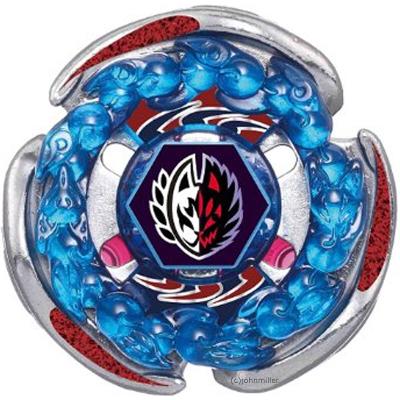
Screw Fox Spiral Fox Metal Fury Random Booster 8 Beyblade BB-116 - USA SELLER
$16.98
About this Item
Available stock:
49

Shipping

MPN : [WOONG984]
Country/Region of Manufacture : [United State]
Brand : [Brand New]
UPC : [369251298315]

Screw Fox Beyblade (Individual Bey. No Launcher, No Ripcord) What's Included: Face Bolt Energy Ring Metal Wheel Spin Track Performance Tip Sticker Set COMES WITH TRACK & TIP RANDOMIZED! New Unused Condition. (Comes With Out Any Sort Of Manufacturer's Packaging. You Will Receive Item in Poly Wrap & Shipping Box With All Parts Disassembled) Free Standard Shipping in the United States. -Expedited Domestic Service Also Available -International Shipping is $5.99
Customer Reviews

5.0 out of 5 stars based on 19 reviews
This Metal Wheel Spin Is Really Impressive And Amazing
I purchased this screw fox metal fury random booster beyblade from Brand New for my son and it looks really classy and amazing. This wheel spin is made from genuine metal which ensures the durability and desirability as well. The detailed design with blue and red color attracts me a lot.
ByShawn Cole
Mama said...
You see my momma used to say "there is a great big world out there. That I needed to stop lifting weights in my room, stop watching tv in the basement, stop playing video games on my Intellivision." I have always had that voice in the back of my head. I have moved out on my own and started a family, but I for the past 22 years I just keep coming back to what my momma said. Well I finally did something about it and used the interwebs at my local buffet style family dining establishment (borrowing my momma's smartphone) and ordered the TP-Link AC1750 Smart WiFi Router, as a companion piece to a modem surfboard. I am not what you would call well with the electronics, but this piece of manufacturing was easy for me to set up and even brought my son and I closer together as we worked on it as a daddy/son project. Once this was set up the whole family dynamic changed, the kids no longer fight with each other, my wife no longer hollars stuff to me at my face, we watch the entertainment on the tv with the airdropping of shows and movies. My momma was right... there is a whole great big world out there, and now my family and I can see if wireless from our phones and tablets!
ByTJ Burke
5 GHZ Antenna Will Not Stay Connected
Prior to this purchase, I had 3 other wireless routers that I returned because they just won’t work! I got tired so I bought the cheapest one (this) instead. To my surprise, this is the one that worked for me. I like the router admin page’s ease of use, as well as the phone app (named “Tether”) made by TP-Link. The admin page can also generate a QR code which you can print and put in a wall so whenever you have guests, they can just scan the QR code to connect to the internet.
ByZ
No-Frills Wireless Router
I have Mediacom 200 Mbps service. Setup was fast and easy. Connected to three smart TV's, two Home Theater Receivers and three desktop PC's without issue. One PC is wired direct through the LAN port I get 240-255 Mbps. My second PC is at the opposite end of my 1740 sq/ft house from the router and I use a TP-Link Archer T4UH adapter I get 170-180 Mbps download speed. My third PC is only about 25 feet away using a Belkin model F9L1109v1 adapter I get 142-145 Mbps download speed: I also tried a Netgear AC1200 adapter model A6210 that gets about 120 Mbps on this PC. My point is the wireless adapter you use will make a difference. This router is on most top 10 lists for 2018 and cost a lot less than the others on those lists. I am happy with the performance so far. I just hope it lasts longer than the last TP-Link router I purchased.
ByKikkomann
Not bad at all
The router arrived while I was at work, so my teenage son transferred all the cables from the old router to the new one, configured the password, and everything worked perfectly without any advanced config. Our network printer connected flawlessly to the router, and I then reconfigured the printer on 3 computers running Windows 10. It has never been so easy to set up that printer. Much easier than my old Netgear router ever was.
ByOl' Hesty
Happy So Far
This is a replacement for a 15 year old router I had but it works beautifully. If I would have known that it would work this good I would have bought it a long time ago. Covers the entire apartment all the way to the street and parking lot. Says to can handle 50 devices so I am not sure about that but I do know at least 12 devices it can support. No drop signal or dead spots. Fast deliver to.
ByDangerrD
Best out-of-the-box experience!
I installed several smart devices with different aps in my condo and became concerned I may open my network to hacking. Replaced my old router with a built in modem with this TP-Link AC1750 and a TP-link Modem. After reading some of the reviews I had real concerns about failing on the installation. The installation of both were easy and I was able to get all of my devices back on wifi quickly. I installed all of the smart home devices on the guest band keeping them out of my network. Everything is working better than I expected.
ByNerdyElf
Great product
This being my second tp-link router, I love the reliability of the product and they have excellent tech support when needed. This model comes with the tether app that is very easy to use.
ByKeith Baker
Good Value
After getting the router setup I had the hardest time getting access to the Net. The password didn't work at first and my PC couldn't connect. Half the problem was my fault. I wanted a dual network and simply misconnect the PC. Once that was done I still had issues with the router. I had Wi-Fi signal but couldn't connect. After reaching to TP-Link , which didn't get back with me, I searched online and figured out that I had to go to the router link ( http://tplinkwifi.net ) to gain total access. After this was achieved I was able to setup passwords and instantly my PC was connected to the NET. I'm not tech savvy and the instructions were vague but I am happy with this router. My other router is the TP-Link Touch which I truly love. TECH NOTE: For those who are not tech savvy just remember to have all your connected devices off..including the modem. Once you have made the correct connections plug in the router and wait for all lights to come on then plug in the router and wait for all lights to come on especially the internet light, then lastly turn on all device that you have connected to your router. Another note: Your cable line goes into your modem...then the Ethernet cable from the modem goes into your WAN/Internet port...and the Ethernet cable from your PC goes into one of the ports on your router. Remember to go the routers link and type in the IP Address.
ByCrazy legs
Affordable yet reliable
Gigabit confirmed. After a much troubleshooting, I’m getting full 950mb+ speed thru Ethernet on the Router. Sadly Gigabit is too advanced & nothing supports gigabit wifi yet so there’s no way to test wifi speeds. It’s future proof I guess. My iPhone maxes out at 250mb & I hit that easy. The UI & LED night time settings are worth a try. ZERO latency on PS4. Instant HD streaming. 4 stars cuz there’s no way to test the wifi.
ByJordan W
Mama said...
It was super easy to install. The internet reception went from poor to good in the living room. That is important because I want to cut the cord on my tv and do live streaming.
ByTJ Burke
5 GHZ Antenna Will Not Stay Connected
UPDATED REVIEW: The admin user interface has gotten better and the overall performance/reliability of the 2.4 GHz and 5 GHz radios has improved. Not perfect, but much better.
ByZ
Easy to install. Good coverage
Great coverage and super fast. I have a 1700 sqft home and this router has signal everywhere. The router is placed downstairs in a corner and the speed is phenomenal with very low loss, even upstairs in the farthest opposite corner! The app is awesome as well and allows you to configure everything, including passwords, name, block list, parental control, ect.
ByMaggieA
Updated: Improved Stability
I've been an Apple person forever. I had a 2nd gen airport extreme which I used for time capsule. It was actually slowing me down so much, with a direct connection to the modem, I was getting 170-180mbps of the 150mbps I am paying for, but my AP was only giving me about 30-40. The guy who worked for Apple support told me that it's obsolete and that Apple stopped selling and making Airports. So while on the phone with him, I found this router and when I told him it was only $70, he was shocked. This is last year's version of a $200 model. Let me tell you, this router did not throttle my speeds at all! I was getting between 170-180 on WiFi. It allows you to be connected to 5ghz while controlling smart home devices that only work on 2.4ghz without switching networks. So, this was the first non-Apple router I've purchased myself, and I'm extremely happy with my choice. It's excellent. Especially for the price.
ByBuzzfuster
Great router with great speed and coverage!
I know tons of folks are going to have this issue so going to put the fix here: Problem: - Internet from ISP directly connected to device ethernet port gives us a fast signal - however connected through the router (wired, wifi & either or) the internet speed slows down to a trickle. Fix: 1. Make sure firmware is updated - Advanced > System Tools > Firmware Upgrade 2. Make sure NAT Boost is off - ( Leave NAT setting right above it enabled i.e. don't mess with it) - Advanced > System Tools > System Parameters : Scroll to NAT 3. Make sure Duplex is set to 1000Mbps full duplex (same area as 2. above) - Advanced > System Tools > System Parameters : Scroll to Duplex 4. DNS - This one is important because if the above doesn't help this is probably the last recourse for most people - Advanced > Network > Internet - scroll to Advanced middle of the page - it's slightly hidden. Click Advanced. Change Primary DNS to: 8.8.8.8 and Secondary DNS: 8.8.4.4 - click save After you save go to reboot or restart router. Enjoy! All the best!
ByKarmjeet B.
Excellent Router, Amazing Router
It has a really nice setup and interface, seems to have plenty of options and capabilities. One thing that I did find quite annoying is after my initial setup I figured on upgrading the firmware. The firmware upgrade wiped out all of the settings I had created and basically started it off like it was a fresh device, with some unknown password. Luckily a factory reset set the password back to the default one and I was able to re-setup the entire thing from scratch (it did of course keep the new firmware). So if you're planning to do a firmware upgrade make sure to back up your settings beforehand and be ready to have to get at and hold that little button for 5 seconds.
ByHeather
Was initially slow - but fixed the issue
I bought the TP-Link AC1750 to replace a positively ancient D-Link router I've used since 2010 or earlier. It's one of those tech items that don't inspire sessions of gear lust and drooling over the specs of the latest iteration. Once a WiFi router works we set it & forget it. I've known that was a mistake but still figured if my old one kept chugging along, what ain't broke... After lots of intermittent drops and various internet weirdness I broke down and decided to get a new router. I studied the state of the WiFi internet router art for a few days, VERY thoroughly, and this model kept coming up in recommendations across the web. It's competitive price and free return guarantee made it relatively painless and when it arrived setting it up was the same. The Android/Apple app that TP-Link has to control the routers functions made the entire process minutes vs. hours (I've spent hours before putting fussy technology into service), this was a breeze. The included pic shows the results. I'm averaging over 200% (!) better speeds than I was with the old D-Link router. Because this routers dual bands are broadcast separately you pretty much have two networks, the 2.4 & 5Ghz. The 2.4Ghz has better range and the 5Ghz has greater speeds; having that option is great and it means more devices can use the separate networks, reducing congestion. This is a seriously stout router for the cost and I'm extremely pleased with it. The routers optional mobile app has a ton of features you can dig into if you want to get deep into all of the routers possibilities, and it's also about as plug and play as it gets. During the mobile browsing, streaming and gaming I've done so far the TP-Link hasn't dropped a signal and the speeds have been insane. Great router, great deal. Highly recommended.
ByTerrance
I'm happy, but a warning
This router has a very simple user interface, it can be setup and ran by someone with minimal knowledge. It has many of the standard features like white and black listing, port forwarding, etc. However, for someone like myself that needs to make this router as secure as possible... its not very secure. WPS can NOT be disabled. I have no idea what TP-Link was thinking, WPS is a basic vulnerability in all routers that have it equipped. This is why you can disable it. To be clear, WPS sends out a "PIN" unencrypted for the device that wants to connect, if you snag that "PIN" you can then see all traffic to and from that pc. I realize that many people love WPS and aren't worried about that level of security, which is why I wanted to write this review. Finally, it is Alexa enabled. You can use it to allow someone to connect with the above WPS, reset the router, and the only feature I've used via Alexa is to turn off the lights on the front of the router. For an inexpensive router for a novice user that isn't worried about security it is great, for a security minded person skip this model.
ByAno223
Great wifi router for novices.
I’m one of those people who just doesn’t keep up on certain electronic items. I recently moved into a house from a small apartment and was laughed at and told that I needed a new router ASAP. Somehow my old trusty netgear router that I bought for 30$ 10 years ago just wasn’t going to cut it anymore. Apparently they need to be updated every 2-3 years or something ;-) Alas I was somehow able to have mine continue working for that long but I did end up having some spotty service issues at time and chalked it up to being charters fault. Evidently it was not (all the time anyways) Back to this router. I got it for a home that’s about 2800 square feet-basement and two stories. My husband works mid management customer service from home on two devices and a headset running off of it, my daughter lives playing games on her tablet, and I live on my iPhone & streaming cable and sometimes throw in an extra iPhone and PC to make $ online watching videos on the side at the same time. Add in my brother in law who rents out our basement and it seems to be a lot of items being used at once. I’ve had ZERO issues with disconnections, spotty service or problems with it reaching throughout my whole home while using ALL of the above at the same time. I AM THRILLED ?? and kind of shocked. Going for the gold on this one I guess. I went from one that dropped calls while my husband was working on his headset for work and resetting constantly to this has been amazing and I never knew I was missing out on it. Now if I only could get it to work for ten years like this...
ByT Hughes


